
How to stop a running timer?
99% of the time, stopping the running timer is as simple as clicking the stop button. The only scenario where this isn't the case is when the workspace has Required fields enabled.
In that scenario, attempting to stop the timer will lead to an error such as this...
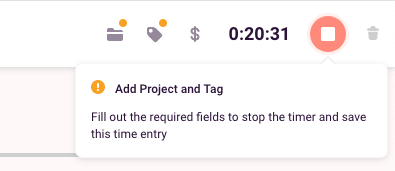
To fix the problem simply add the required information and the app will allow you to save the time entry. In rare cases where no projects are available to you (and you can't create new ones), you might need to contact a workspace admin and ask them to assign a project to you.
Updated on: 06/16/2026
Thank you!